Simple
Καθημερινές μετατροπές, λιγότερα βήματα.
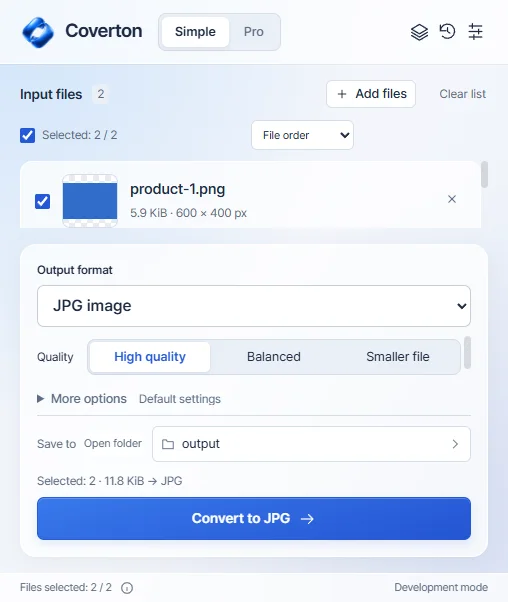
Επιλέξτε αρχεία, μορφή εξόδου και ποιότητα και, στη συνέχεια, αποθηκεύστε ένα ξεχωριστό αποτέλεσμα.
 COVERTON FOR WINDOWS
Κατεβάστε την υπογεγραμμένη beta για Windows. Δοκιμάστε δωρεάν για 7 ημέρες, χωρίς κάρτα ή αυτόματες χρεώσεις.
Simple / ProDownload the installer for 64-bit Windows 10 or 11 PCs. A native Windows ARM installer is not provided.
Install Coverton and copy your device ID from License. Register the PC in your account to begin a 7-day trial without a card.
Import the .coverton-license file downloaded from your account into the app. Manage your Windows subscription and registered PCs in your account.
Επιλέξτε αρχεία, μορφή εξόδου και ποιότητα και, στη συνέχεια, αποθηκεύστε ένα ξεχωριστό αποτέλεσμα.
Κάντε προεπισκόπηση αρχείων, βρείτε συμβατά εργαλεία, διαχειριστείτε μια παρτίδα και χρησιμοποιήστε ξανά τις προεπιλογές σας.

Πραγματική ανάπτυξη των Windows στα Αγγλικά. Η εφαρμογή για υπολογιστές υποστηρίζει αυτήν τη στιγμή 10 γλώσσες.
For 64-bit Windows 10 and 11 PCs. On another device, copy this page link to open on your PC or visit that platform’s dedicated page.
Buy a monthly or annual Windows subscription through Creem. Subscriptions renew automatically in USD; local taxes are additional. Confirm the final total at checkout.
US$24.99
Every year US$24.99
Save about 48% vs 12 monthly paymentsAbout US$2.08/month · billed annually
Local taxes extra · automatic renewal · 2 PCs
Subscribe in your accountUS$3.99
Every month US$3.99
Local taxes extra · automatic renewal · 2 PCs
Subscribe in your accountMac App Store purchases are managed separately through Apple.
1. Download the signed installer and install Coverton. Publisher: 케이제이.
2. Open License in the app, copy your device ID, create an account and register the PC. The 7-day trial starts without a card.
3. Import the downloaded .coverton-license file into Coverton. Add multiple files, use the Pro queue, or open the document and spreadsheet editor.
Find Mac requirements, the App Store and Apple subscription information on a separate page.